_White_Background_square_1920px.png?width=256&height=96&name=FLEETWATCH%20Fleet%20Information%20Technology%20by%20S%26A%20Systems%2c%20Inc%20(06_28_2021)_White_Background_square_1920px.png)
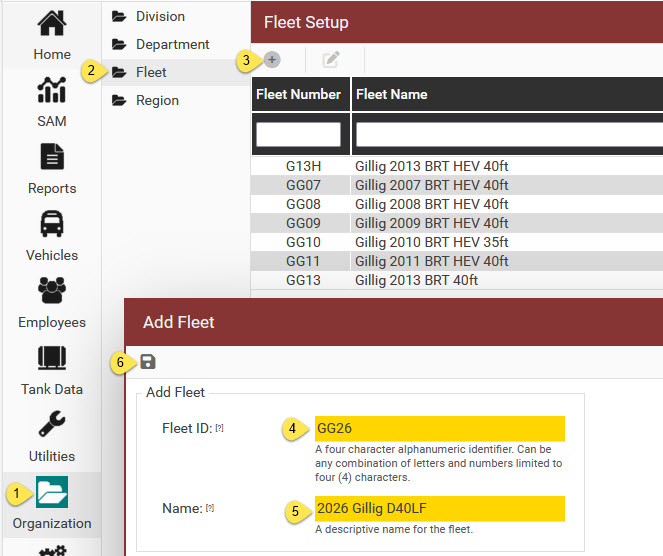
Creating a dedicated fleet allows you to isolate and track specific vehicles independently from your main fleet. By grouping assets, you gain granular visibility into your operational data, making it easier to monitor Miles Per Gallon (MPG), track distance traveled, and monitor fuel and fluid consumption. Allows you to directly compare fuel and energy consumption across different routes, vehicle sizes, or propulsion types.To add a new Fleet:
- go to the Organization section
- click on the Fleet folder
- click the + to bring up the Add Fleet window
- enter a 4-digit alphanumeric fleet identifier code
- enter a descriptive name for the new fleet
- save!