_White_Background_square_1920px.png?width=256&height=96&name=FLEETWATCH%20Fleet%20Information%20Technology%20by%20S%26A%20Systems%2c%20Inc%20(06_28_2021)_White_Background_square_1920px.png)
If you need to retire several vehicles and don't want to delete them, there's a utility for that.
During your data retention period, it is recommended that you mark recently retired vehicles as **Permanently Out of Service** instead of deleting them. This prevents the vehicle number from being used in the fuel lanes and maintenance bays but retains the historical data.
Important note: if you need to reuse a vehicle number, renumber the Vehicle first. Contact support@fleetwatch.com for assistance renumbering a vehicle. Once it's been renumbered, add the new vehicle from a template to give a clean start!
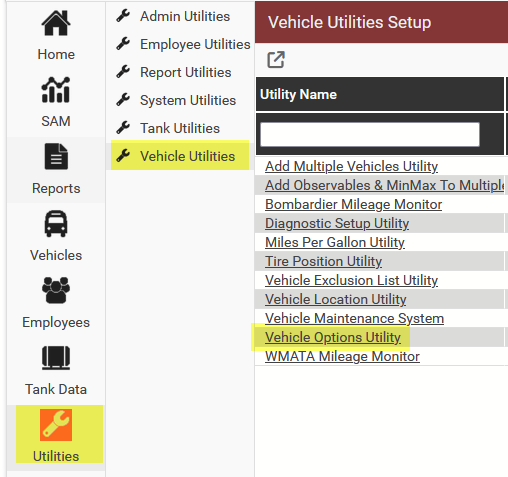
To retire multiple vehicles, go to Utilities, Vehicle Utilities, Vehicle Options Utility
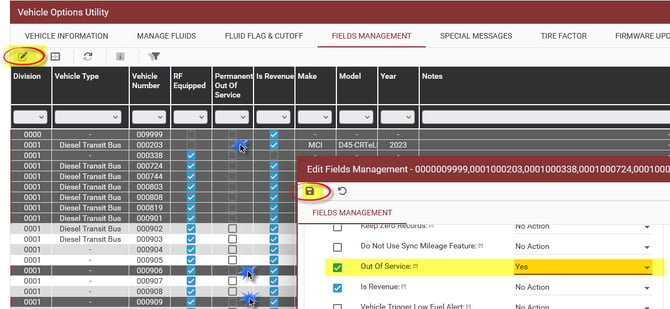
Choose the vehicles you wish to retire on the grid, then click the Edit Selected (pen and paper icon), choose Out Of Service and set it to Yes, the click the Save icon to retire the selected vehicles.
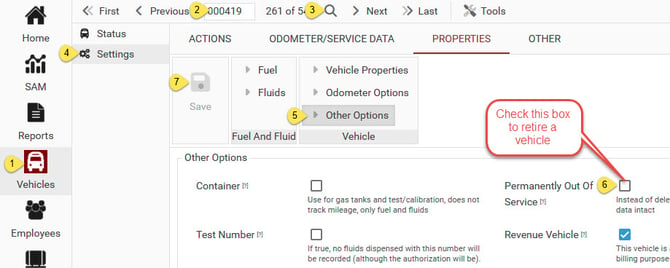
On a related note, if you simply want to retire one or two vehicles:
- go to Vehicles
- type in the vehicle number
- click search
- go to Settings
- go to Other Options
- check the **Permanently Out of Service** box
- save!