_White_Background_square_1920px.png?width=256&height=96&name=FLEETWATCH%20Fleet%20Information%20Technology%20by%20S%26A%20Systems%2c%20Inc%20(06_28_2021)_White_Background_square_1920px.png)
S&A SYSTEMS, INC. · FLEETWATCH FIELD SERVICE PROCEDURE RESETTING THE RIH3000R
A step-by-step procedure for power-cycling and reinitializing a Fleetwatch RIH 3000R Remote Island Head at the JB20 junction box.
EQUIPMENT: RIH 3000R JUNCTION BOX JB20
STEPS4
EST. TIME5–10 min
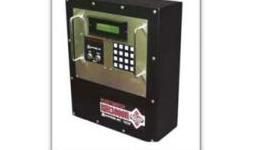
FIG 01 — FLEETWATCH RIH 3000R
WHY YOU'RE DOING THIS
A full power cycle clears irregular prompts, re-calibrates the vehicle detectors/sensors, and re-initializes the RIH's connection to the Fleetwatch server. It's the standard first step whenever the unit is behaving unexpectedly.
BEFORE YOU BEGIN Clear the service lane of all vehicles and personnel before cutting power. This ensures the vehicle detectors/sensors calibrate properly when power is restored.
PROCEDURE AT A GLANCE
PHASE 1 · STEPS 1–2 POWER DOWN Unlock the JB20 junction box and cut power at breaker CB1 for at least 20 seconds.
PHASE 2 · STEP 3 POWER UP Restore power to the RIH at breaker CB1.
PHASE 3 · STEP 4 INITIALIZE & VERIFY Press RESET on the keypad and confirm the unit is talking to the server.
Phase 1: LOCK OUT POWER AT THE JUNCTION BOX
Unlock the JB20 junction box and turn off power to the RIH by switching breaker CB1 to the OFF position. Wait at least 20 seconds before continuing — this pause allows the entire system to fully power down, including the RIH, any internal Moxa, DM, or mini-G serial to ethernet converters, and vehicle detectors.
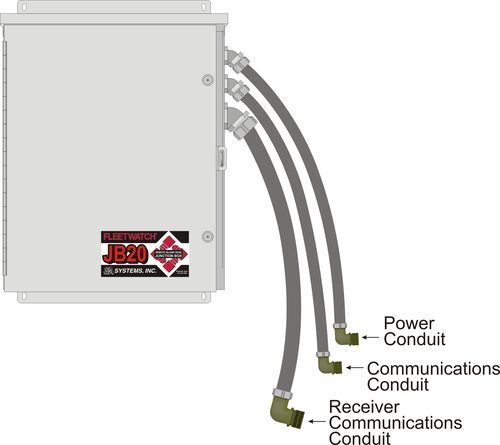
FIG 02: JB20 junction box conduit connections: power, communications, and receiver communications. 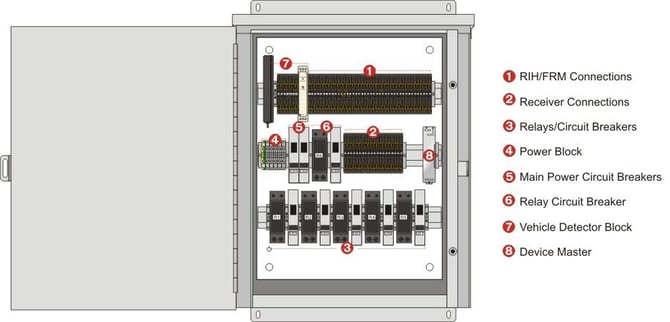
FIG 03: Inside the JB20 junction box, showing RIH/FRM connections, receiver connections, relays/circuit breakers, and power block. 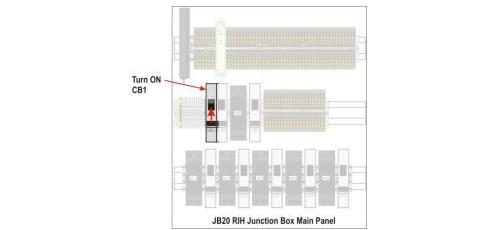
FIG 04: CB1 breaker location on the JB20 main panel.
WAIT 20 SECONDS
Leave power off for at least 20 seconds.
FIG 05 20 → 10 → 0 → GO! Count down a full 20 seconds before restoring power.
PHASE 2 — POWER UP 3
RESTORE POWER AT CB1
Flip the CB1 breaker back to the ON position to restore power to the RIH.
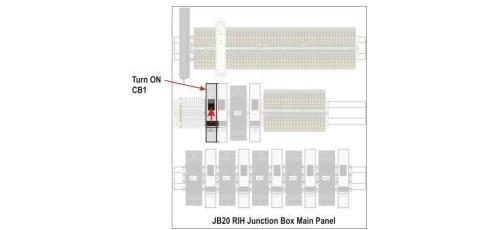
FIG 06: Turn CB1 back on at the JB20 main panel.
PHASE 3 — INITIALIZE & VERIFY 4
PRESS RESET
Press RESET on the keypad to clear any irregularities and start with a new prompt.
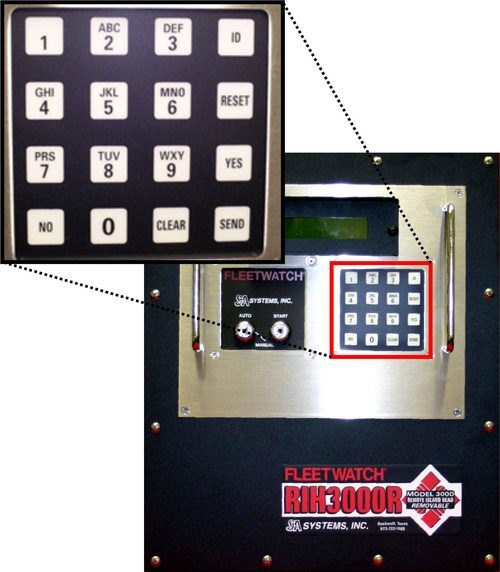
FIG 07: RIH3000R keypad detail — RESET key highlighted. NEED A HAND? For system validation, or if anything doesn't look right after Step 4, call S&A Systems, Inc. ASK FOR SYSTEM VALIDATION (972) 722-1009 S&A Systems, Inc. · Fleetwatch RIH 3000R