_White_Background_square_1920px.png?width=256&height=96&name=FLEETWATCH%20Fleet%20Information%20Technology%20by%20S%26A%20Systems%2c%20Inc%20(06_28_2021)_White_Background_square_1920px.png)
Why set upper/lower MPG bounds and a current MPG baseline:
Vehicles don't get identical mileage every trip due to routes, loads, terrain, idle time, weather, purpose, and driving behavior all cause normal fluctuation. Setting upper and lower bounds establishes the realistic performance envelope for a given vehicle type, so you can flag readings that fall outside expected operation (potential sensor fault, mechanical issue, or data error) rather than treating every fluctuation as an alarm.
The current MPG is the vehicle's actual, live or recently-averaged fuel efficiency, the number you're actively monitoring against those bounds.
- Lower bound: the minimum efficiency still considered normal (heavy load, idling, city stop-and-go, cold starts). Dropping below this suggests a problem worth investigating.
- Upper bound: the maximum efficiency realistically achievable (highway cruising, light load, ideal conditions). Exceeding this often signals a bad reading rather than genuinely great performance.
- Current: the baseline/expected value used for comparison and trending over time.
Bounds should reflect the vehicle's actual use case, not a generic standard. Example, a CNG transit bus (8 / 2 / 4) operates in a completely different range than a Prius service vehicle (55 / 25 / 40), so each vehicle or vehicle class typically needs its own thresholds.
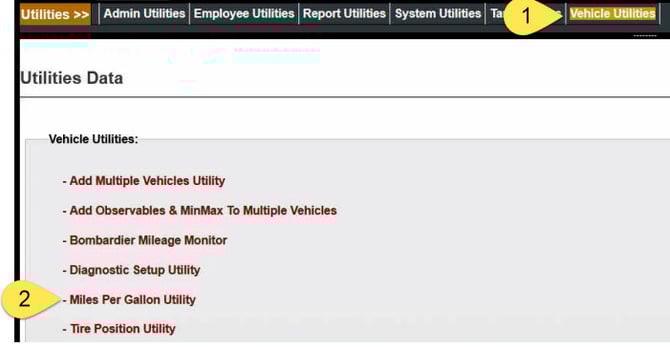
To change the Upper Bound MPG, Lower Bound MPG, and Current MPG settings for multiple vehicles, go to Vehicle Utilities, then the Miles Per Gallon Utility.
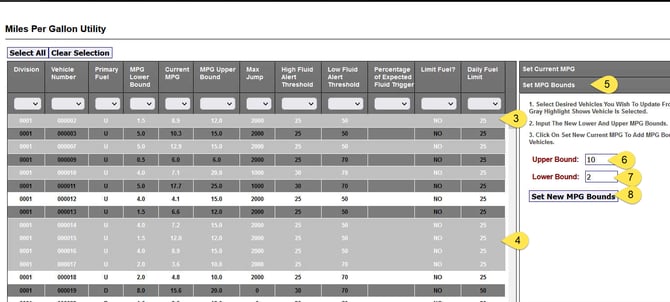
You can select individual vehicles by holding down the CTRL button and using the mouse to click on a vehicle.
You can select a block of vehicles by holding down shift, click on a vehicle, then click on the last vehicle.
Next, click on "Set MPG Bounds".
Enter your desired settings
Click Set New MPG Bounds.