_White_Background_square_1920px.png?width=256&height=96&name=FLEETWATCH%20Fleet%20Information%20Technology%20by%20S%26A%20Systems%2c%20Inc%20(06_28_2021)_White_Background_square_1920px.png)
Why set upper/lower MPG bounds and a current MPG baseline:
Vehicles don't get identical mileage every trip due to routes, loads, terrain, idle time, weather, purpose, and driving behavior all cause normal fluctuation. Setting upper and lower bounds establishes the realistic performance envelope for a given vehicle type, so you can flag readings that fall outside expected operation (potential sensor fault, mechanical issue, or data error) rather than treating every fluctuation as an alarm.
The current MPG is the vehicle's actual, live or recently-averaged fuel efficiency, the number you're actively monitoring against those bounds.
- Lower bound: the minimum efficiency still considered normal (heavy load, idling, city stop-and-go, cold starts). Dropping below this suggests a problem worth investigating.
- Upper bound: the maximum efficiency realistically achievable (highway cruising, light load, ideal conditions). Exceeding this often signals a bad reading rather than genuinely great performance.
- Current: the baseline/expected value used for comparison and trending over time.
Bounds should reflect the vehicle's actual use case, not a generic standard. Example, a CNG transit bus (8 / 2 / 4) operates in a completely different range than a Prius service vehicle (55 / 25 / 40), so each vehicle or vehicle class typically needs its own thresholds.
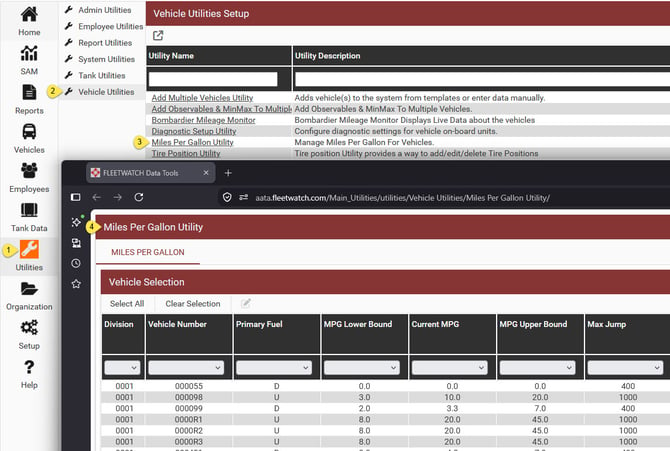
To change the Upper Bound MPG, Lower Bound MPG, and Current MPG settings for multiple vehicles, go to Vehicle Utilities, then the Miles Per Gallon Utility.
Max Jump (max allowed mileage per transaction)
This caps how much odometer distance is allowed to accumulate between two fuel transactions before the reading is flagged as suspect. It exists because a legitimate transaction should correspond to a plausible amount of driving since the last transaction and a jump far beyond that suggests a data error, meter rollover, or even a missed transaction.
The right value depends on the vehicle's fueling pattern relative to the monitored location:
- Vehicles that fuel exclusively at the Fleetwatch monitored location (e.g., a CNG bus tied to a depot, facility, or division) will only rack up mileage consistent with their route between fill-ups, so Max Jump can be set tight at around 400 miles.
- Vehicles that fuel intermittently at the Fleetwatch monitored location but also fuel offsite in between need a much higher ceiling, since more unmonitored driving (and unmonitored fuel-ups) can occur before the vehicle returns — often set around 2,500 miles.
In short: Max Jump should reflect how much unmonitored driving is realistically expected between visits to the Fleetwatch monitored fueling point, not just the vehicle's general mileage patterns.
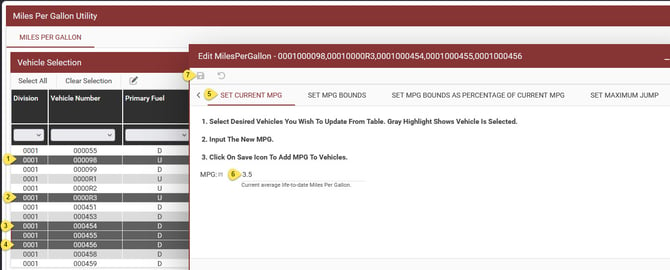
You can select individual vehicles by holding down the CTRL button and using the mouse to click on a vehicle.
You can then select a block of vehicles by holding down shift, then click on a vehicle, then click on the last vehicle in your block. The system will select all vehicles in between in this case.
Next, click on "Set MPG Bounds", or Set Current MPG, or "Set Maximum Jump".
Enter your desired setting(s).
Save!